How To Find My Router Username And Password
Okay, let’s be real for a second. You’re staring at your router, feeling like it’s a spaceship control panel. And now you need the username and password to log in. Where did y...
Okay, let’s be real for a second. You’re staring at your router, feeling like it’s a spaceship control panel. And now you need the username and password to log in. Where did you put that thing? Under the couch? In the abyss of your junk drawer?
Don’t panic. I’ve been there. We’ve all been there. It’s like the router is playing a game of hide-and-seek with your sanity.
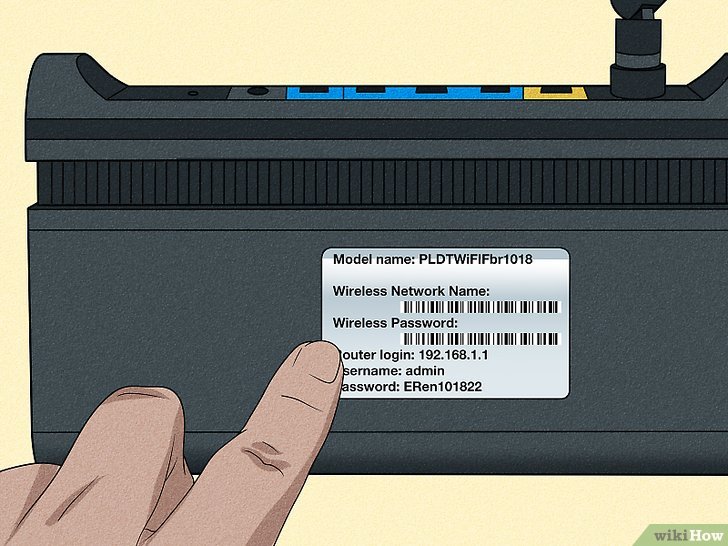
First, check the router itself. Seriously, flip that little black or white box over. Look for a sticker. It’s usually hiding on the bottom or the back.
You’ll see a bunch of gibberish. But right there, in tiny font, is the default username and password. Common ones are “admin” for the username and “password” for the password. How original, right?
If you’re lucky, it’ll just say “User: admin, Pass: admin”. If you’re unlucky, it’s a 20-character monster with numbers and symbols.
Now, what if the sticker is gone? Or it’s worn off like an old treasure map? Don’t worry. Try the classic combos first.
Try admin/admin. Try admin/password. Try root/root. You’d be shocked how many routers never change these. It’s like leaving your front door unlocked.
Still stuck? You can Google your router model plus the words “default password.” For example, “Netgear R7000 default password.” It’s like magic. Someone on the internet already wrote it down for you.
Here’s where it gets tricky. Maybe you changed the password years ago. You know, back when you were feeling ambitious. Now you have no idea what it is.
Don’t smash the router. I know you want to. But there’s a better way. You can factory reset the whole thing. Find a paperclip. Look for the tiny, recessed reset button on the back.
Hold it down for about 10 to 30 seconds. The lights will flash like a disco. Boom. Your router just forgot everything. All your settings, all your Wi-Fi names, everything.
Now it’s back to the factory defaults. That sticker on the bottom? It’s your new best friend again. Use that username and password to log in.
But wait—there’s a catch. You’ll have to set up your Wi-Fi from scratch. That means picking a new network name and password. Write it down this time. Please. For the love of all things good.
What if you don’t want to reset? Maybe you’re scared of breaking stuff. I get it. Check if your computer can help. If you’re on Windows, open the Command Prompt. Type “ipconfig” and find your “Default Gateway.” It’s usually something like 192.168.1.1.
:max_bytes(150000):strip_icc()/001_find-router-password-on-windows-10-5205334-e6cc897d851a480e811a193fe6142219.jpg) How to Find Your Router Password on Windows 10
How to Find Your Router Password on Windows 10
Type that number into your web browser’s address bar. Hit Enter. You’ll see a login screen for your router. But you still need the password. Classic catch-22, right?
Here’s a pro tip. If you have a Mac, open System Settings. Go to Network. Click on your Wi-Fi network, then “Details.” Look for “Router.” That’s your gateway address.
Still no luck? Check your router’s manual. Yes, that dusty booklet you threw in a drawer. It usually lists default credentials. If you lost the manual, find a PDF online.
Now, a word about exaggeration. I’ve seen routers with passwords like “qwerty12345.” I’ve seen usernames be “root” and passwords be “toor” (root spelled backward). Why? Because humans are weird.
If you’re really desperate, try “admin” with a blank password. Or “guest” as the username and “guest” as the password. It’s like playing router roulette.
Let me tell you a little secret. Most people never change the default. So if you bought your router used, the previous owner probably left it as “admin/password.” You’re welcome.
What if you’re in a coffee shop and need your router info right now? Call your internet service provider. They have records. But be prepared for a 20-minute hold and a lot of elevator music.
Here’s a final thought. Once you find those credentials, change them immediately. Pick something funny but secure. Like “MyNeighborIsSpyingOnMe” or “ILoveMyCat.” Just write it in your phone’s notes app.
You don’t want to be back here in a month. Trust me. I’ve been back here a hundred times.
So take a deep breath. Look at that sticker. Google your model. Or just reset the thing. You’re smarter than a router. You know that, right?
Now go forth and conquer. And maybe, just maybe, tape the credentials to the back of the router with a sticky note. Your future self will thank you.

